Company documentation and rules platform
The right, current information in seconds. With its source.
Procedures, rules, files and pages live in each department’s own space. Employees find what they need, and adding information is just as easy. For every piece of information, who added it and who published it is on record.
- Search in Turkish, Arabic and English
- Nobody sees what they may not see
- The assistant answers with sources
Intro video
See Saha Doküman in 90 seconds
A short tour made from recordings of the real application.
Features
Everything you need to find, add and trust information
The goal is simple: employees reach the right, current information, adding information takes no effort, and every piece of information has a known owner.
Block-based pages and “Rules”
Pages are made of text, rule, link, file, image and table blocks. Rules are marked Allowed, Required, Forbidden or Info, and the Rules view gathers them all in one list.
Easy contribution and approvals
Templates, quick add and Word import make adding information a few taps. Changes go to the department admin for approval, and the admin can correct them before approving.
Contribution checks
Before every addition and change there is a language review and a similar-information check. If the information already exists you see it; if a match is hidden from you, you only learn “which department, whom to ask”.
Search in Turkish, Arabic and English
Search covers titles, rules, page content and attached files. It finds results even when you type without Turkish characters, and it understands Arabic letter variants and word forms.
AI assistant with cited sources
Ask a question and the assistant answers from approved documentation only, and only from pages you may view, showing the source of every statement.
RAG for other AI systems
Approved content is a knowledge base. A retrieval API and an MCP server, used with personal access tokens, give other AI tools this knowledge with the permissions of the user.
Ledger: who added, published, changed, deleted
The history of every block is traced back to who added it and who published it. Records are append-only and linked by a chain of hashes; they cannot be edited or deleted.
Fine-grained access
Grant view and edit rights by department, position or person. A “Why can they see it?” screen shows where a person’s access comes from, and every change applies on the next request.
Files and images
Upload PDF, Word, Excel and PowerPoint files and images; their content is searchable. Uploads are inspected, images are re-encoded and links are signed.
Version history, diff and trash
Every publication creates a new version. Compare versions, go back to an older one, and restore deleted items from the trash. Nothing is deleted for good.
Freshness and review reminders
Pages have an owner and a review date. Overdue pages carry a “This information may be out of date” notice and their owner is reminded.
Home dashboard
Favorites, recently viewed pages, pending approvals and notifications on one screen.
Audit and provenance viewer
Admins can see what a person added, published, edited and deleted; every recorded action sits in the audit log.
User import from Excel
Upload your staff list in one go with a ready-made template; users are created in bulk.
Mobile app
An app for Android and iOS: read, search, contribute, approve and ask the assistant.
Three UI languages, including right-to-left Arabic
Turkish, Arabic and English; the language is chosen per user. The Arabic interface runs fully right to left.
The app in pictures
These pictures are taken from real recordings of the application in the intro video.
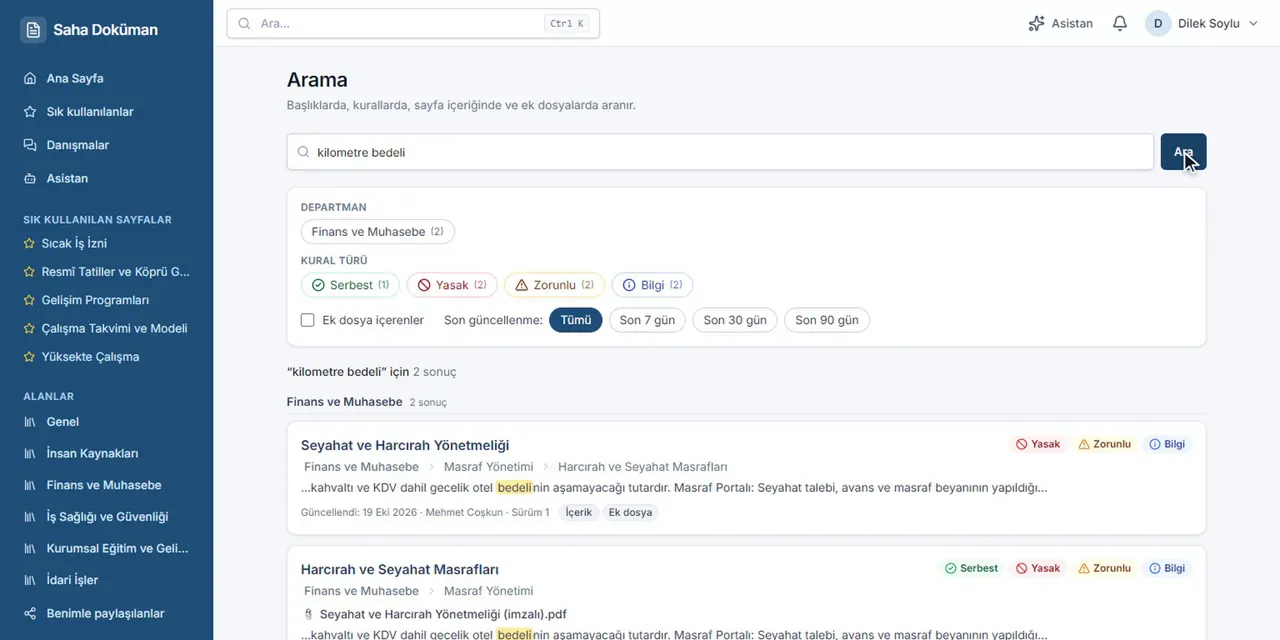
Find what you need
Highlighted results, filtered by department and rule type. You can type without Turkish characters.
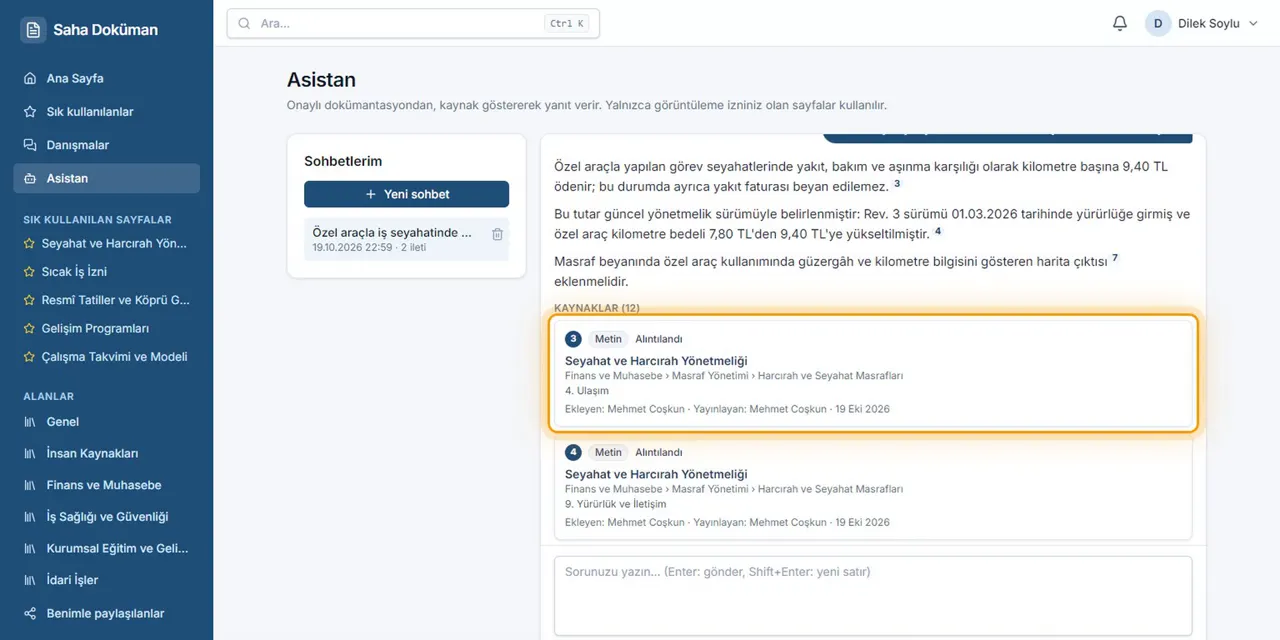
Get answers with sources
Every statement has its source next to it: which page, who added it, who published it and when.
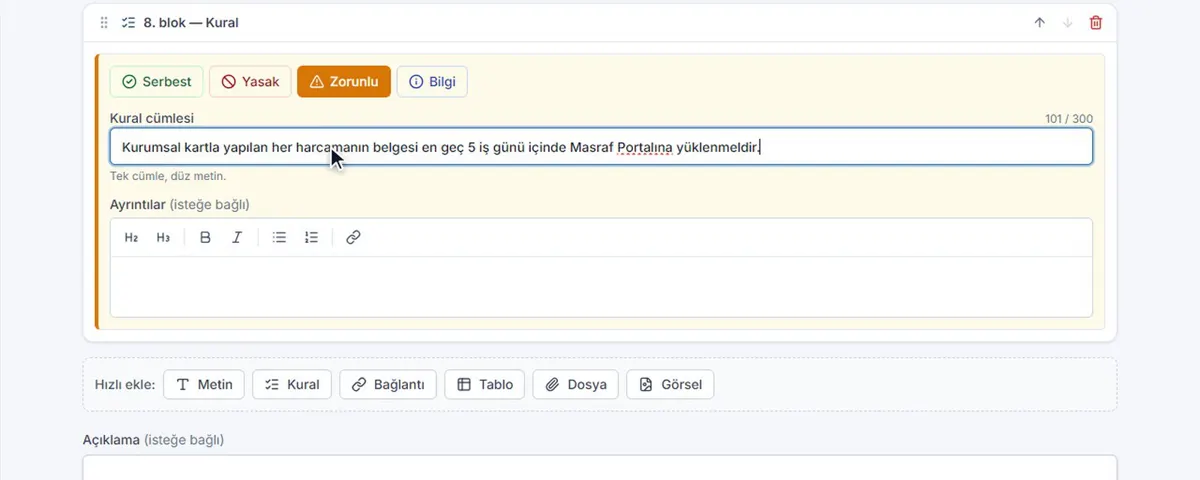
Add information easily
A rule block: pick the kind, write one sentence, send it for approval.
The content on screen is sample data, shown in the Turkish interface.
Security and privacy
Information reaches only the people who should see it
Saha Doküman’s three criteria come before every other trade-off. If a feature conflicts with them, the feature gives way.
S1
The right information is easy to get
Search, the Rules view and the assistant, each with who wrote it, who published it and whether it is current.
S2
No leak through any channel
Information does not reach anyone who may not see it, not through a page, a search hit, a file, a notification, an assistant answer or an error message.
S3
Correct, verifiable permissions
Admins see who can see what and why; every change takes effect immediately and is recorded.
Deny by default
If we are not sure whether something may be shown, it is not shown. Every query passes through one visibility filter.
Even the existence of hidden information is hidden
A resource you may not see answers “not found”, not “forbidden” (404, never 403). Counts, suggestions and error messages do not give it away either.
Signed file links bound to the user
File links are signed and bound to the user who requested them; a link passed on to someone else does not work.
A ledger that cannot be rewritten
Publishing events are append-only and linked by a chain of hashes. A verification job re-checks the whole chain.
AI sees only permitted excerpts
Every excerpt that goes to the assistant or to an external AI tool is filtered by permission first and checked again before it leaves; only approved content that is open to AI is used.
Embeddings are computed on your server
The text vectors for semantic search are produced on your own server with Ollama (bge-m3); the content does not leave at this step.
Claude answers only if the company turns them on
The assistant’s answers come through the Claude API, built only from short permitted excerpts and only when the company enables it. Content marked “Closed to AI” is never sent.
Separate data for every SaaS company
In the SaaS every company has its own database, file folder and service container; keys are per company, so one company’s session is worthless at another.
AI
AI never goes beyond your permissions
Because approved content is versioned and structured, it works as a knowledge base. The in-app assistant and external tools go through the same gate, under the same permission rules.
How a question is answered
Narrow by permission
Only excerpts that are approved, open to the asker and not closed to AI are candidates.
Hybrid search
Semantic (vector) and full-text results are merged.
Check again
The page of every selected excerpt is checked once more before anything leaves.
Answer with sources
The answer is written with each statement tied to a source.
What goes to Claude
- Your question and short conversation context
- Approved short excerpts you may view
- Only if the company turned the assistant on
- With citations and caching enabled
What never goes
- Content you may not view
- Content marked “Closed to AI”
- Pending, rejected or deleted content
- Whole documents
How it works
One application, a clear publishing flow
The web and mobile apps, and other AI tools over MCP, talk to one Saha Doküman application over HTTPS. Content, versions, the ledger and the knowledge base live in PostgreSQL; embeddings are computed on your server with Ollama, and Claude only ever sees permitted excerpts.
- Client
- Service
- Data store
- External
- main path
- data flow
- in the background
- permission-filtered
Clients
- Web app — React 19
- Mobile app — Flutter · Android / iOS
- External AI — MCP · access token
One Saha Doküman application
- Saha Doküman API — .NET 10 · permission engine
- Assistant (RAG) — hybrid search + re-check
- Embedding worker — in the background
Data and AI
- PostgreSQL 18 — content · versions · ledger · knowledge chunks + vectors
- Ollama · bge-m3 — local embeddings
- Claude API — Anthropic · optional
The journey of a piece of information
From the moment someone writes it to the moment someone finds it: every step has an owner, and four checkpoints stand on the way.
- Client
- Checkpoint
- Service
- Data store
- External
- main path
- data flow
- in the background
- permission-filtered
Add
Draft
Written in the web or mobile app, from a template, or imported from Word.
Contribution check
Language review and similar-information check. If the information already exists, you see it first.
Before saving
Approve
Change request
The contribution goes to the department admin with its note.
Approval
The admin reviews it, corrects it if needed, and approves or rejects it.
Before publishing
Publish
One publishing service
The new version is written together with who added it and who published it.
Ledger
Append-only and linked by a chain of hashes: the record cannot be rewritten.
Index
Search index
Updated at once, ready for search in Turkish, Arabic and English.
Knowledge chunks
Sections, rules, tables and file pages become short excerpts that keep their source.
Local embeddings
Vectors are computed on the server with Ollama; the text does not leave.
Find and answer
Search
Only pages you may see; hidden ones do not show, not even as a count.
Permission filter
Assistant
Semantic and full-text results are merged; if the company enabled it, only permitted excerpts go to Claude and the answer cites them.
Checked again
Other AI tools
Through MCP with a personal access token, under the same permissions.
Checked again
Four checkpoints on the way
- Before savingEvery addition and change passes a contribution check.
- Before publishingA contributor’s change is published only after an admin approves it.
- Permission filterEvery result and every excerpt is filtered by the user’s permissions.
- Checked againEach excerpt is checked once more before it leaves for AI.
Languages
Turkish, Arabic and English
The interface language is chosen per user, and search understands all three. Texts the system writes (explanations, notifications) are in the user’s language.
Türkçe
العربية
English
- The reference language. Search works without Turkish characters.
- A full right-to-left interface; Arabic letter variants and word forms are recognised in search.
- Interface and search in English; server texts in the user’s language.
The product name stays “Saha Doküman” in every language.
Mobile app
In the field, on your phone
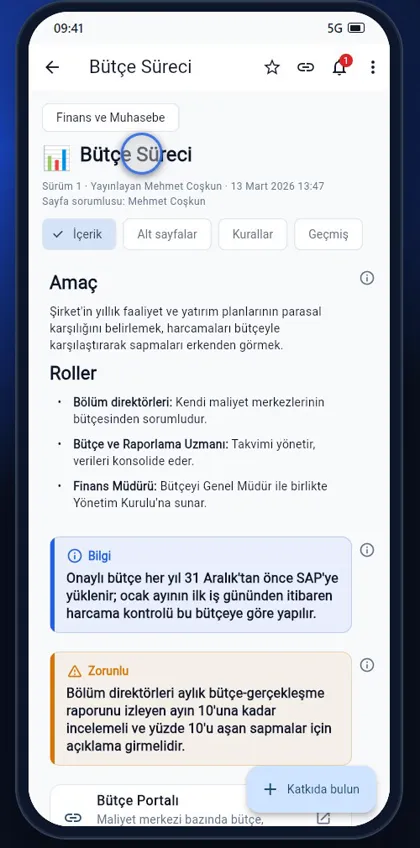
Built with Flutter, the app runs on Android and iOS; the same permissions and the same three languages as the web app apply.
- Read pages, rules and history
- Search and ask the assistant
- Contribute in a few taps
- Approve pending items from the field
SaaS or license
Choose how you want to run it
Use Saha Doküman as a service we operate, or install it on your own infrastructure.
SaaS
Your company runs at its own address: companycode.sahadoc.com.
- A database of its own for your company
- A file folder of its own
- Its own service container and keys
- Onboarding and subscriptions managed from the platform console
Subscriptions
Trial
Try it free, once per company.
Monthly
A subscription renewed every month.
Annual
A subscription renewed every year.
Source-code license
License the source code and install it on your own servers.
- On-premises installation
- Your own infrastructure and data
- Run it on your own servers
Pricing
Subscription plans and prices
Monthly or annual payment; every company runs at its own address with its own database.
Loading prices…
Request a demo or ask a question
Tell us what your company needs and we will work out the demo, subscription and license options together.
Send an e-mail